Home Contact WIN

Provider Portal Training

WIN Premier Portal Homepage Overview How to Search for a Patient How to Request a New Authorization for Patient How to View a Patient’s Authorization History How to Edit or Void a Pending Authorization Request How to Submit Medical History Information for Patient How to Upload Documents under a Patient’s Portal Profile How to Submit an Outcome Form to WIN How to Search for Claims and Remittance Report

WIN Premier Provider Portal Features

The following services are available upon login:

• Search for a patient in the WIN system
• Request a new authorization for your patient
• Edit and void Pending authorization requests
• Submit medical history information
• Upload Documents
• View a patient’s authorization history
• Receive notifications on submitted authorization requests
• Submit outcome form
• Search Claims

877.444.4946

Member Search

Please enter Member's ID number with the Alpha Prefix and Member's Date of Birth. Please note as of 07/01/2020 City of NY member IDs may have changed. You can search with Old ID or New ID


In Active Member
Active Member
Member Search
Member ID First Name Last Name Preferred Name DOB Auth Number Address Contract MemberStatus Network Type Click To Select

Claim Search


ClaimListTable
Member ID First Name Last Name DOB Authorization # Click To Select

My Profile


© Copyright 2026 WINFertility, a division of WIN (Women's Integrated Network, Inc).

Notification


Notification
Notification Date Notifications User Name


Happy Thanksgiving

WINFertility will be closed on Thursday, November 24 and November 25 in observance of the Thanksgiving holiday.

However, patients will have the support services of a Nurse Care Manager by calling the toll-free WINFertility number during this time.
Please try to get your authorization and prescription requests in early for any patients in cycle.

We are here to provide support to both you and your patients.

Have a safe Holiday.
 Download 

Learn how to work with WIN

 Download 

Learn how to work with WIN

Info center


Member ID Card


MemberIDCard
MEMBER NAME:
MEMBER ID:
COMPANY:

Accumulator Data

AccumulatorDataCard
BENEFIT LIMIT:
REMAINING BALANCE:
TOTAL USAGE:
Doula Accumulator

AccumulatorDoulaCard
ACCUMULATOR LIMIT:
ESTIMATED AMOUNT:
FINAL AMOUNT:
REMAINING AMOUNT:


Learn how to work with WIN

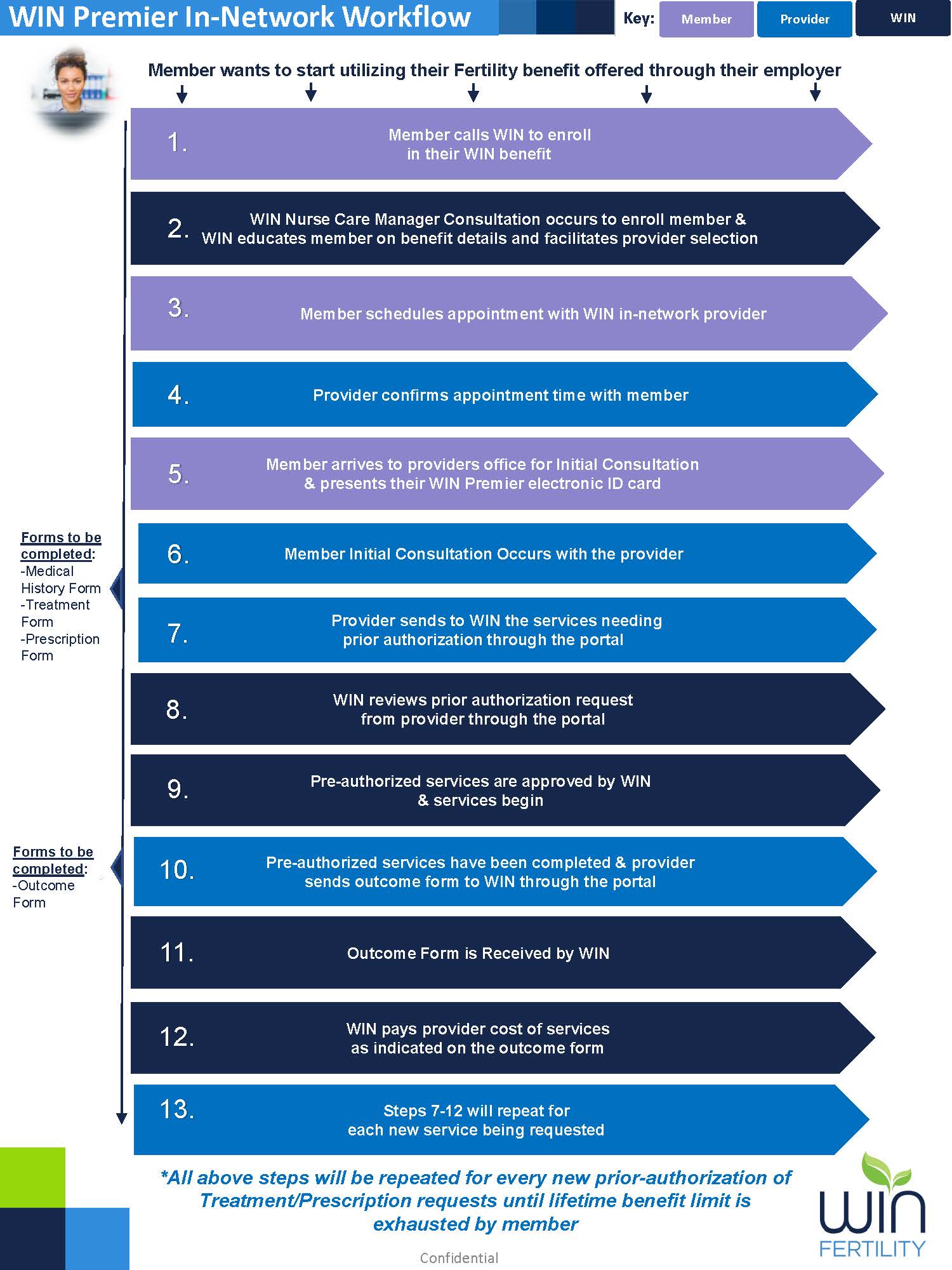
  • Provider Confirms appointment time with Member.
  • Provider uses the portal to look patient up by WIN I.D #.
  • Provider books appointment with member and confirms appointment under member via portal.

  • Initial Consultation Occurs.
  • Following appointment, three forms must be completed in the portal by the porrovider before services can begin.
    • Medical history form
    • Treatment form
    • Prescription form
  • Provider submits Pre-Authorization forms to WIN.
  • Services are Authorized, Provider can start services for Member & Provider must submit an outcome form once services are completed. This will need to be done in order for provider to get paid.
  • Prior steps will take place again for every new service that is added/needs to be authorized.


Change Password